 TurfAI User Guide
Agents
Reusable, goal-driven AI workers that reason with tools.
What it is
An Agent is a first-class, reusable AI worker: a goal, a set of tools, and a model. Given the goal, it runs the ReAct loop (reason → act → observe) — picking tools and acting until the goal is met — and returns an answer plus a reasoning trace. Agents are managed independently, tested in a playground, and referenced from workflow nodes.
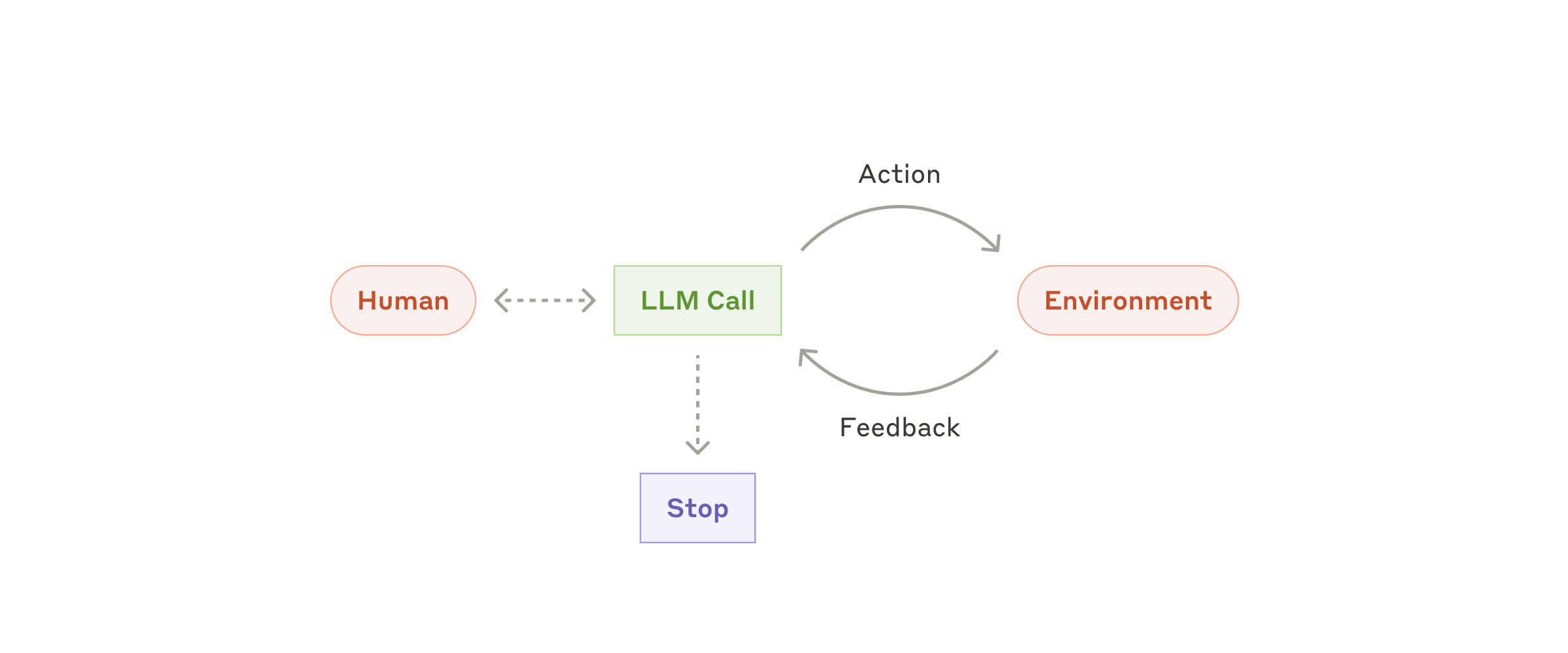
The shape of every agent: loop on tool calls, treat each result as ground truth, and stop on completion or a human checkpoint.
Source: Anthropic ↗Foundational framing adapted from Anthropic's "Building effective agents".
When to use it
Use an agent for any open-ended single job: answer questions about a corpus, extract from a document of unknown shape, draft a communication, analyse risk. If one specialist can reach the goal, it is an agent; if it needs several roles, it is a squad. See the decision guide and the agentic automation concept.
How it works
Process flow — config to result:
Call flow — execution through the platform:
When agent_id is set, the processor fetches the saved agent and merges it as defaults —
inline config wins. Mergeable fields are goal, available_tools, custom_tools, model,
max_iterations, temperature, prompt_title, conversational, context_resolvers,
business_hours, mcp_servers, and guardrails.
Sub-features
- Two modes — stateless (single-shot, for pipelines) and conversational (multi-turn with session memory).
- Playground — single-shot and chat modes with a per-turn trace timeline.
- Tool registry — governed list of tools (
classify_document,extract_from_document,search_documents,summarize,send_email,fetch_url,fetch_drive_file,generate_text, plus built-inescalateanddelegate). - Custom tools & MCP servers — extend the catalog with your own REST endpoints (
custom_tools) or external MCP servers (mcp_servers). - Workflow reference — a node sets
agent_id; inline fields override saved defaults (merge behavior).
Tool resolution rule. available_tools has three meanings: omitted/null → all registry tools;
[] → no tools (pure conversational/text-only agent); a list → exactly those tools.
Configuration parameters
Reconciled against the agent schema (agent/schema.json).
| Parameter | Type | Default | Description |
|---|---|---|---|
name | string | — (required) | Agent display name |
description | text | — | Human-readable note on what the agent does |
slug | string | — | Unique URL-safe identifier (used by delegate and the planned public endpoint) |
goal | text | — (required) | Objective; supports {{variables}} from workflow inputs |
available_tools | json (array) | [] | Tool ids the agent may use (see resolution rule above) |
custom_tools | json (array) | [] | User-defined REST tools merged into the tool set at runtime |
mcp_servers | json (array) | [] | External MCP servers (inline configs or registry IDs) whose tools are discovered and added |
guardrails | json (object) | {} | Output controls: block_patterns (redact phrases) and require_tool_for (force tool-backed answers on listed topics, else escalate) |
context_resolvers | json (array) | ["conversation","temporal","channel"] | Which context blocks to assemble (conversational mode only) |
business_hours | json | null | Optional schedule consulted by context resolvers |
model | string | vertex | LLM model (vertex, gemini-2.5-flash, gemini-2.5-pro, openai, gpt-4o, anthropic, claude-sonnet-4-5) |
max_iterations | integer | 10 | Max ReAct cycles; capped at 20 by the processor |
temperature | float | 0.3 | LLM temperature (0–1) |
prompt_title | string | — | Custom system prompt from Prompt Lab; falls back to the built-in agent prompt |
conversational | boolean | false | Multi-turn mode (loads session history, runs context resolvers) |
active | boolean | true | Active status; inactive agents are skipped by delegate/slug lookup |
session_id is a per-request field (not stored on the agent) that turns on multi-turn memory.
branding, welcome_message, and allowed_origins exist on the record for the planned public
chat endpoint; api_key/owner are managed by the platform.
Tips & best practices
- One job per agent. A tight goal beats a sprawling one. If the goal has "and then" in it for two different roles, it is probably a squad.
- Fewest tools that reach the goal. Every extra tool is a distraction and a cost — more tokens per
reasoning step and more ways to go wrong. A policy-Q&A agent usually needs only
search_documents(+summarize). - Write goals as outcomes, not procedures. "Answer HR questions using company policy documents and cite the source" works better than a step-by-step script — the ReAct loop plans the steps.
- Use conversational mode only for back-and-forth. Pipelines and webhook jobs should stay stateless (single-shot). Conversational adds session storage, context resolvers, and history tokens.
- Set
available_tools: []for a pure chat agent (FAQ bot, drafting assistant) — no tools, cheaper, faster. - Keep
max_iterationslean. Most single-tool goals finish in 2–4 iterations; raise it only when the task genuinely needs many tool calls (it is hard-capped at 20). - Graduate to a squad when you need distinct roles (researcher → writer →
reviewer) or a manager that delegates. Use the built-in
delegatetool for occasional hand-offs; reach for a squad when delegation is the whole design. - Anti-patterns: a "do-everything" agent with all tools enabled; embedding rigid step lists in the
goal; high
temperaturefor extraction/classification; using conversational mode inside a one-shot pipeline; piling on tools "just in case".
Concrete examples
Saved agent config (JSON) — created via POST /api/agents:
{
  "data": {
    "name": "Policy Assistant",
    "description": "Answers employee questions from the policy knowledge base",
    "goal": "Answer the question using company policy documents and cite the source: {{question}}",
    "available_tools": ["search_documents", "summarize"],
    "model": "vertex",
    "max_iterations": 6,
    "temperature": 0.2,
    "conversational": true
  }
}
Single-shot request (Pattern B — JWT) against the saved agent, with inline overrides:
curl -X POST http://localhost:1338/api/workflow-executions/test-llm-node \
  -H "Authorization: Bearer $JWT" -H "Content-Type: application/json" \
  -d '{
    "task_type": "agent_task",
    "config": { "agent_id": 5, "temperature": 0.1 },
    "inputs": { "question": "What is our remote-work policy?" }
  }'
Result (poll GET /api/workflow-executions/:id/status until completed, then read outputs):
{
  "answer": "Employees may work remotely up to 3 days/week (source: Remote Work Policy v2).",
  "reasoning_trace": [
    { "type": "act", "tool": "search_documents", "args": { "query": "remote work policy" } },
    { "type": "observe", "status": "success", "result": "Found 3 policy documents" },
    { "type": "answer", "content": "Employees may work remotely up to 3 days/week..." }
  ],
  "tools_used": ["search_documents"],
  "iteration_count": 2,
  "metadata": { "session_id": "agent_a1b2c3d4-...", "max_iterations": 6 }
}
Multi-turn (session memory). Create a session with POST /api/agent-conversations to get a
session_id (format agent_<UUID>), then pass that same session_id in config on every turn. The
processor loads prior history (sliding window of the last 40 turns) so follow-ups like "Does that apply
to contractors?" are answered in context. Reuse one session_id per thread; create a new one for a new
topic.
Referencing an agent from a workflow node — an agent_task node points at a saved agent and
overrides only what differs:
{
  "type": "agent_task",
  "config": {
    "agent_id": 5,
    "goal": "Summarise this contract's risk clauses: {{contract_text}}",
    "available_tools": ["search_documents", "summarize"],
    "max_iterations": 8
  }
}
The node inherits the saved agent's model/temperature/tools as defaults; the inline goal,
available_tools, and max_iterations win. See task node mechanics.
Dependencies
- DMS — agent CRUD, prompt fetch, MCP-server registry, and (for conversational mode) session/message storage.
- Agent processor — runs the ReAct loop (
processor.py, execution-time source of truth). - LLM service and the tool registry (
tool_registry.py). - Tools pull in their own services: RAG query for
search_documents(see Knowledge Base), email, Drive, REST; external tools via Integrations / MCP.
Limitations
- No long-term memory. History is sent up to a sliding window (default 40 turns); dropped turns are compacted into a brief summary, but there is no durable cross-session memory.
- Conversational sessions are independent — no shared memory across sessions.
max_iterationsis hard-capped at 20; goals needing more steps belong in a squad or a workflow.- The visual agent-designer canvas (editing agent internals on a drag-and-drop surface) is coming soon — planned, not current. Configure agents via the form/API today.
- The public agent endpoint (
POST /api/agents/:slug/chat, API-key auth) is planned; use the JWT or webhook patterns in the meantime.
Troubleshooting
| Symptom | Likely cause | Fix |
|---|---|---|
| Agent loops without answering / repeats the same tool | Goal is ambiguous, or the tool returns nothing useful so the LLM keeps retrying | Tighten the goal; verify the tool's prerequisites (documents indexed, URL reachable); the processor dedupes repeated document_id extractions automatically |
Tool calls fail (status: error in trace) | Missing prerequisite, bad args, or tool not registered | Check the observe step's error; confirm the tool id is in available_tools and the underlying service is configured (e.g. RAG for search_documents) |
Hits max_iterations (answer says "unable to complete within the iteration limit") | Too many steps for the budget, or the agent never decides it's done | Raise max_iterations (≤20), simplify the goal, or split into a squad |
| Slow / expensive | Too many tools, high max_iterations, large history, or a heavy model | Trim available_tools; lower max_iterations; use a lighter model (e.g. gemini-2.5-flash); keep conversational off for pipelines |
Empty {{goal}} / variable comes through literally | The {{var}} name doesn't match a key in inputs | Map the variable in the node's input mapping; the processor leaves unmatched {{names}} unchanged so a literal {{question}} means the input was never supplied |
| Multi-turn forgets earlier facts | session_id not reused, or facts dropped past the 40-turn window | Reuse the same session_id; rely on the auto-summary of dropped turns, or restate critical facts |
How to test
Repeatable checklist:
- Create an agent with goal
"Answer questions about company policy and cite the source: {{question}}"andavailable_tools: ["search_documents"](POST /api/agents). - Single-shot in the playground (or
POST /api/workflow-executions/test-llm-nodewithagent_id+inputs.question); poll status untilcompleted. - Confirm the trace —
reasoning_traceshowsact → observe → answer,tools_usedlistssearch_documents, and the answer cites a source. - Toggle
conversational: trueand create a session (POST /api/agent-conversations) to get asession_id. - Verify session memory — send a first message, then a follow-up ("Does that apply to contractors?") with the same
session_id; confirm the second answer uses prior context. - Reference from a workflow — add an
agent_tasknode withagent_id, run the workflow, and confirmoutputs.answerflows to the next node.
APIs used
| Method | Path | Purpose |
|---|---|---|
GET / POST | /api/agents | List / create agents |
GET / PUT / DELETE | /api/agents/:id | Read / update / delete an agent |
POST | /api/workflow-executions/test-llm-node | Run agent (single-shot or multi-turn via session_id) |
GET | /api/workflow-executions/:id/status | Poll execution status / read outputs |
POST / GET | /api/agent-conversations | Conversational sessions (create / list) |
GET / POST | /api/agent-conversations/:sessionId/messages | History / store message |
DELETE | /api/agent-conversations/:sessionId | Delete a session and its messages |