 TurfAI User Guide
Workflows vs. agents vs. squads
Choosing the right unit of automation for the job.
TurfAI offers three units of automation. They are not competing — they nest. A squad is a team of agents; an agent can be one node inside a workflow. Choosing well is mostly about how much judgement the step needs and how predictable you want it.
The decision
How they compare
| Workflow | Agent | Squad | |
|---|---|---|---|
| Unit | Graph of typed nodes | One goal + tools | Team of agents + tasks |
| Control | You define every edge | Agent decides each step | Manager or pipeline orders the agents |
| Best for | Predictable, auditable pipelines | One open-ended job (extract, answer, draft) | Complex jobs needing multiple specialists |
| Determinism | High | Medium | Lower (more moving parts) |
| Shared state | {{variables}} between nodes | Conversation/session memory | Blackboard (shared whiteboard) |
| Example | "Upload → classify → route → email" | "Answer questions about company policy" | "Settle a claim: evidence → coverage → valuation → offer → compliance" |
How a squad coordinates
A squad follows a well-known multi-agent pattern — an orchestrator decomposes the goal, delegates sub-tasks to specialist workers, and synthesizes their results:
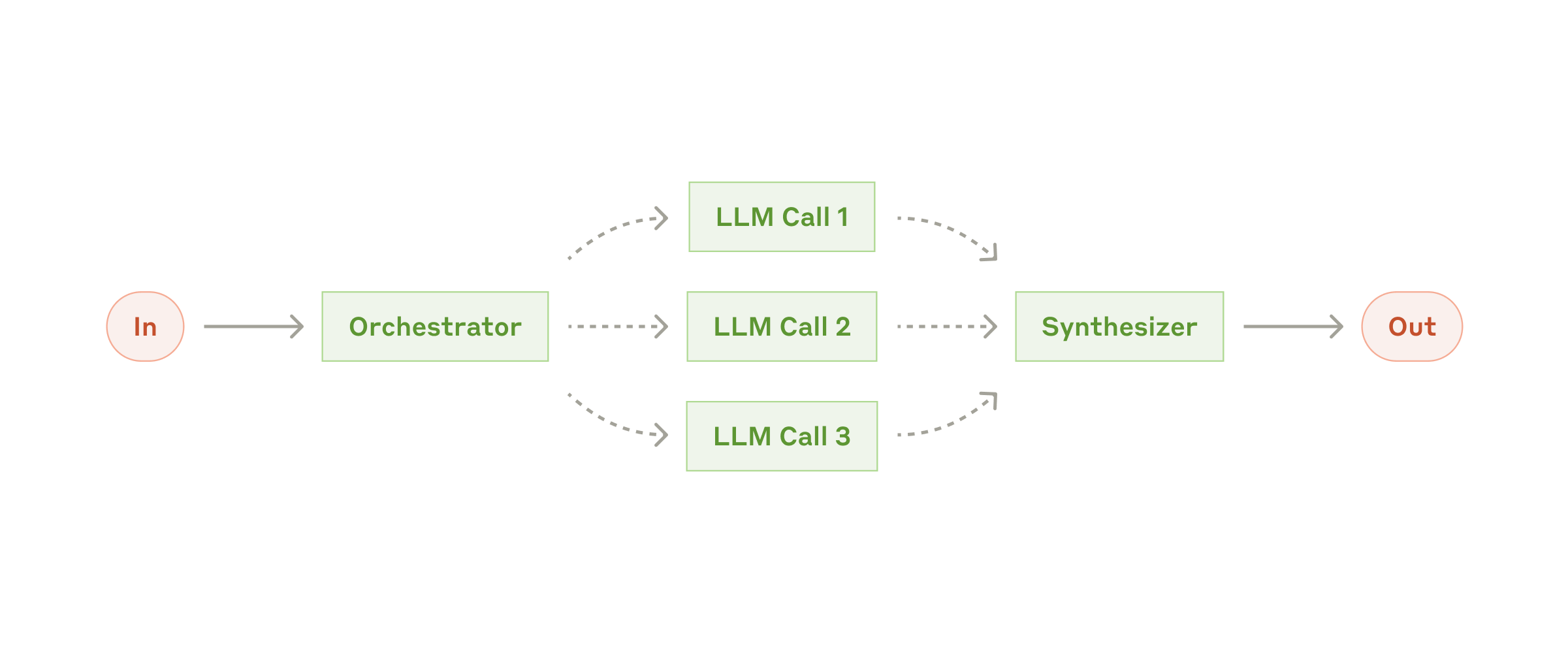
Orchestrator–workers — a hierarchical squad's manager agent, or a sequential pipeline you draw yourself.
Source: Anthropic ↗Pattern framing adapted from Anthropic's "Building effective agents".
A squad runs its members sequentially (tasks execute in dependency order) or
hierarchically (a manager agent delegates work using a delegate tool). Either way they
share a blackboard — each task writes its result to an output_key that downstream tasks
can read, with every write logged to an audit trail.
Rules of thumb
- Start with a workflow. If the steps are knowable, wire them — it is the most auditable.
- Reach for an agent when a single step is open-ended: "figure out X", "answer Y", "draft Z". Drop the agent in as one node in the workflow.
- Reach for a squad only when no single agent can hold the whole job — when you'd otherwise give one agent five unrelated responsibilities. Split them into specialists.
See the modules for each: Visual Workflow Builder, Agents, Squads.