 TurfAI User Guide
Integrations
Connecting TurfAI to external systems — Google, REST, OAuth2 providers, and MCP.
What it is
Integrations are how workflows and agents act on the outside world: send email, fetch from Google Drive, read/reply in Gmail, call any REST API, and connect to external tools over MCP (Model Context Protocol). Users connect their own accounts via OAuth; tokens are stored securely per user and auto-refreshed at execution time.
Two layers power the catalog:
- A provider registry (
integration) — one row per available provider (Google Drive, Gmail, Microsoft 365, Salesforce, Slack, …). Adding an OAuth2 provider is config, not code. - Per-user token storage (
user-integration) — each user'saccess_token,refresh_token, expiry, and connectionstatusfor a given provider.
The provider field is a free-form string, and a generic OAuth2 adapter drives the
authorize → callback → refresh flow from a JSON config. So a new OAuth provider is added by
seeding one registry row and setting two env vars — no schema migration, no new processor.
When to use it
Use integrations for the act half of an automation — the step after the AI has decided something. Email/Drive/Gmail for Google workspaces, REST for any HTTP system, MCP to expose TurfAI tools to external clients.
| You want to… | Use |
|---|---|
| Pull a file the workflow needs to process | Google Drive — Fetch |
| Read inbound mail and act on it | Gmail — Fetch (filter by label/sender/subject) |
| Reply in-thread to a customer | Gmail — Reply |
| Notify a person with a templated message | Email — Send ({{variable}} body) |
| Call any other system (Slack, Jira, CRM, your own API) | REST API node |
| Let Claude Desktop / Cursor drive TurfAI | MCP server (read-only today) |
How it works
Whether the model uses a built-in tool, your REST endpoint, or an MCP server, the shape is the same: the model emits a structured call, your runtime runs it, and the result returns so the model can continue. Integration nodes are the "your runtime runs it" half.
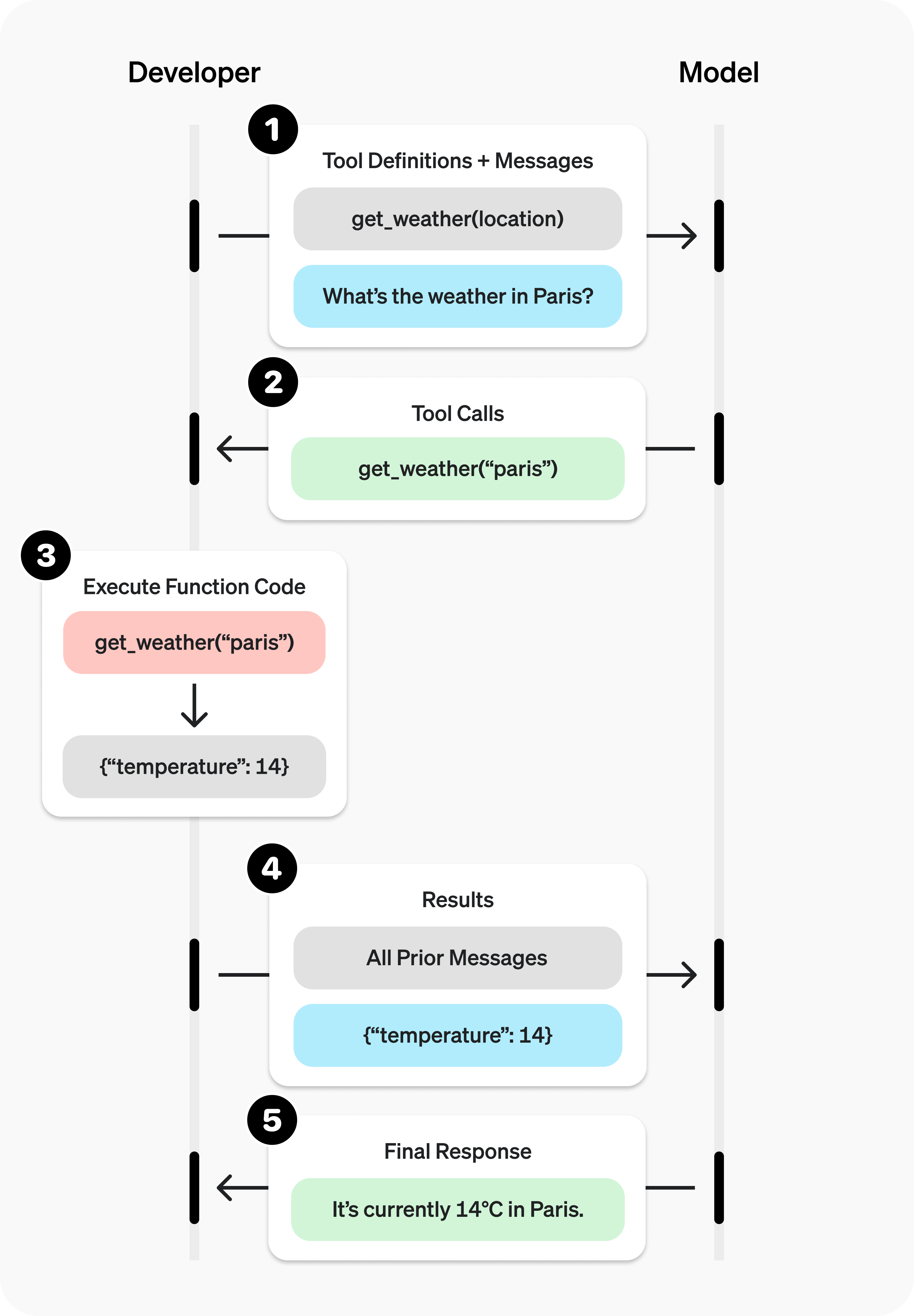
The tool-calling loop. In TurfAI the workflow executor is the runtime that runs the call.
Source: OpenAI ↗Tool-calling loop adapted from OpenAI's function-calling guide.
Process flow — connect then use:
At execution time the workflow executor runs enrichWorkflowWithOAuthTokens() right after
enrichWorkflowWithCredentials(): for any node referencing a provider it looks up the user's
user-integration, auto-refreshes the token if it expires within ~5 minutes, persists the new
token, and injects a plain oauth_access_token into the node's input_mapping. The processor
never sees OAuth — it just gets a token.
MCP is the open standard for these tool connections — think of it as a USB-C port for AI: connect once to a standard, reuse everywhere, instead of a bespoke integration per tool.
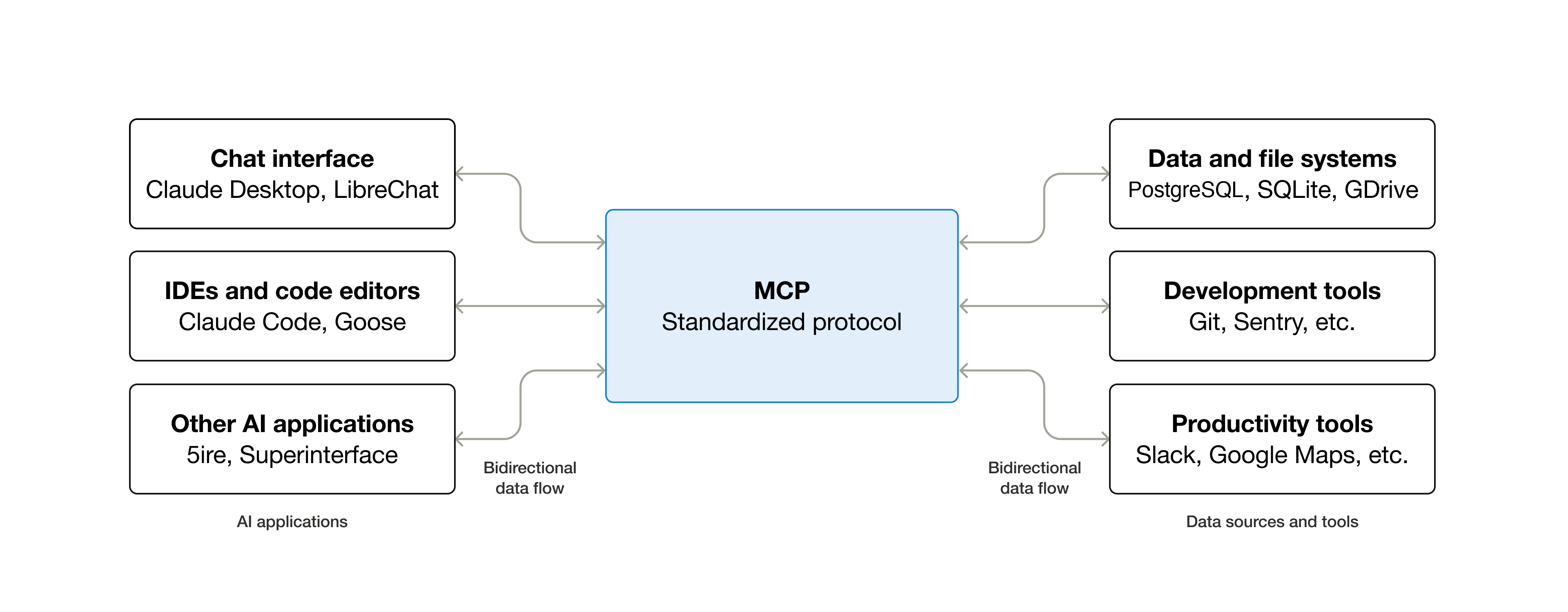
MCP standardizes how an AI app plugs into external tools, data, and workflows.
Source: Model Context Protocol (Anthropic) ↗"USB-C for AI" framing adapted from modelcontextprotocol.io.
Call flow — MCP today (read-only wrapper):
Sub-features
- Google Drive — fetch by
file_id, or search byfolder_id+file_name; imports into DMS (GCS). Dual-mode: user-delegated OAuth or a server service account. - Email (SMTP) — HTML body,
{{variable}}substitution, to/CC/BCC, custom sender. Best-effort (a send failure doesn't fail the whole workflow). - Gmail — fetch with filters (from, subject, label, unread, date, attachments), reply with thread preservation, download attachments.
- REST API — GET/POST/PUT/PATCH/DELETE, template vars in URL/headers/body, JSONPath
output_mapping, configurabletimeout, SSRF-guarded. - Generic OAuth2 adapter — any OAuth2 provider via
oauth_configJSON (Microsoft 365, Salesforce, Slack seeded today); PKCE supported. - MCP — TurfAI MCP server exposes document/workflow/RAG tools to external clients (read-only wrapper today); outbound MCP (agents calling external MCP servers) is planned.
- Integration catalog — browse, connect, and manage user integrations and credentials.
Configuration parameters
Provider registry — integration (oauth_config)
These describe a provider, not a user. Reconciled with
dms/src/api/integration/content-types/integration/schema.json.
| Field | Type | Notes |
|---|---|---|
provider | string (unique) | Free-form slug, e.g. google_drive, microsoft_365. No enum — add providers without code. |
name, description, icon, category | string/text | Catalog display + grouping. |
enabled | boolean | Show in catalog (default true). |
auth_type | enum | oauth2 | api_key | hmac | custom (default oauth2). |
scopes | json | Required OAuth scopes / permissions. |
config_schema | json | Per-provider config options schema. |
auth_config | json | Generic auth keyed by auth_type (e.g. api_key_env for API-key providers). |
oauth_config | json | OAuth2 details — see below. |
oauth_config JSON (the heart of the generic adapter):
| Key | Example | Notes |
|---|---|---|
authorize_url | https://login.microsoftonline.com/common/oauth2/v2.0/authorize | Provider authorize endpoint. |
token_url | https://login.microsoftonline.com/common/oauth2/v2.0/token | Token exchange + refresh. |
userinfo_url | https://graph.microsoft.com/v1.0/me | Optional; populates metadata. |
revoke_url | null | Optional; adapter skips revoke if null. |
client_id_env | MICROSOFT_CLIENT_ID | Env var name, not the value — resolved at runtime. |
client_secret_env | MICROSOFT_CLIENT_SECRET | Same — secrets never live in the DB. |
default_scopes | ["User.Read","Mail.Read","offline_access"] | Requested at authorize. |
supports_pkce | true | Use S256 PKCE challenge. |
extra_authorize_params / extra_token_params | { "response_mode": "query" } | Provider quirks. |
Per-user token storage — user-integration
Reconciled with dms/src/api/user-integration/content-types/user-integration/schema.json.
| Field | Type | Notes |
|---|---|---|
user / integration | relation | Owner + provider. |
status | enum | connected | disconnected | error (default disconnected). |
access_token | text (private) | Injected into nodes at runtime; never returned in API responses. |
refresh_token | text (private) | Used by auto-refresh. |
token_expires_at | datetime | Drives the "refresh if expiring within ~5 min" check. |
config | json | User-scoped settings — incl. Pattern B bring-your-own client_id/client_secret. |
metadata | json | Provider info (email, username) from userinfo_url. |
last_sync | datetime | Last successful use/sync. |
webhook_id | string | Google Pub/Sub watch ID (Gmail push), etc. |
Credential resolution order: the adapter checks user-scoped
user-integration.config.client_id / client_secret first (Pattern B — enterprise tenant brings
its own OAuth app), then falls back to the platform env vars named in oauth_config
(Pattern A — one shared app, per-user tokens).
Node config (in a workflow)
| Node | Key params |
|---|---|
| REST API | url, method, headers, body, timeout (default 60s), output_mapping; optional oauth_integration to inject a token |
| Email Send | to, cc, bcc, subject, body/html, sender |
| Gmail Fetch | from, subject, label, is_unread, after/before (YYYY/MM/DD), has_attachment, max_results (10), download_attachments, mark_as_read |
| Drive Fetch | file_id or (folder_id + file_name) |
Tips & best practices
- REST API is the universal connector. You rarely need a dedicated processor — any HTTP API
(Slack, Jira, HubSpot, Stripe, your own service) is a REST node with the right headers and an
output_mapping. Reach for a custom processor only for streaming files, pagination, or webhook subscriptions. - Reuse credentials via
{{variable}}, never hard-code secrets. Put API keys in the credential store and reference them — e.g."Authorization": "Bearer {{slack_bot_token}}". The executor resolves them at run time and they never appear in the workflow definition. - Request least-privilege scopes. Ask only for what the workflow needs (e.g.
drive.readonly,gmail.readonly) so consent screens are easy to approve and a leaked token does less damage. - Let the platform handle token refresh. Don't store or pass access tokens yourself — set
oauth_integration: "<provider>"(or connect Google) and the executor refreshes + injects. - For OAuth setup, store env var names in
oauth_config, then set the actualPROVIDER_CLIENT_ID/PROVIDER_CLIENT_SECRETin the environment. Restart DMS and the provider appears in the catalog with a working Connect button. - Map outputs narrowly. Pull just the fields you need with JSONPath
output_mappingso downstream nodes get clean, named values instead of a giant response blob.
Concrete examples
1 — Connect a Google integration (OAuth). From the Integrations catalog click Connect on
Google Drive / Gmail. The popup requests the default scopes
(drive.readonly, gmail.readonly, gmail.modify, gmail.send, userinfo.email,
userinfo.profile) with access_type=offline and prompt=consent so a refresh token is
issued. On callback, tokens land in your user-integration and status flips to connected.
2 — REST API node with custom headers + JSONPath output mapping.
{
  "task_type": "rest_api_task",
  "config": {
    "url": "https://api.example.com/v1/orders/{{order_id}}",
    "method": "GET",
    "headers": {
      "Authorization": "Bearer {{example_api_key}}",
      "Content-Type": "application/json"
    },
    "timeout": 30,
    "output_mapping": {
      "order_status": "$.data.status",
      "total": "$.data.amount.total"
    }
  }
}
{{order_id}} and {{example_api_key}} resolve from inputs / the credential store; the executor
applies the JSONPath output_mapping so downstream nodes see order_status and total.
3 — Gmail fetch with a label filter.
{
  "task_type": "gmail_fetch",
  "config": {
    "label": "Invoices",
    "is_unread": true,
    "has_attachment": true,
    "max_results": 10,
    "download_attachments": true
  }
}
Returns { emails: [...], attachments: [...], count }; attachments are imported to GCS for
downstream processing.
4 — Email send with a templated body.
{
  "task_type": "email_task",
  "config": {
    "to": "{{customer_email}}",
    "cc": "ops@acme.com",
    "subject": "Your order {{order_id}} shipped",
    "html": "<p>Hi {{customer_name}},</p><p>Order <b>{{order_id}}</b> is on its way.</p>",
    "sender": "support@acme.com"
  }
}{{customer_email}}, {{order_id}}, {{customer_name}} come from the workflow context.
5 — Outbound to a non-Google OAuth provider (e.g. Microsoft 365 once connected): set
oauth_integration and the executor injects oauth_access_token for you.
{
  "task_type": "rest_api_task",
  "config": {
    "oauth_integration": "microsoft_365",
    "url": "https://graph.microsoft.com/v1.0/me/messages",
    "method": "GET"
  }
}
MCP read-only wrapper note. The TurfAI MCP server exposes document/workflow/RAG tools to clients like Claude Desktop and Cursor over stdio. Today it is a read-only wrapper: it creates DMS jobs and polls results — it cannot mutate platform config. Outbound MCP (agents calling external MCP servers) is planned, not yet available.
Dependencies
- Google OAuth 2.0 (legacy Google-specific flow) for Drive/Gmail; generic OAuth2 adapter
for everything else; per-user token storage in
user-integration. - DMS as the single API gateway — frontend, processors, and the MCP server talk only to DMS, never directly to provider SDKs or Python services. DMS owns OAuth token handling.
- Processors execute integration tasks; job router / Redis dispatch them.
Limitations
- Drive/Gmail require the user to have connected Google OAuth with the right scopes (and to have granted offline access so a refresh token exists).
- The MCP server is read-only today; outbound MCP to external servers is planned.
- REST calls honour SSRF protections — blocked schemes (
file,ftp,gopher,data,javascript), blocked metadata hosts (169.254.169.254,metadata.google.internal), and private/reserved IP ranges. Self-calls back to DMS are explicitly allowed. - Tier 1–3 providers beyond the seeded three are coming soon (see Roadmap).
Troubleshooting
| Symptom | Likely cause | Fix |
|---|---|---|
| OAuth token refresh fails; node errors with auth | No refresh_token stored (user didn't grant offline access), or the user revoked the app | Reconnect the provider; the Google flow requests access_type=offline + prompt=consent to force a fresh refresh token. Persistent failures retry with backoff, then flag status=error. |
| REST node times out or returns non-2xx | Endpoint slow/down (5xx, 429 → transient) or bad auth/URL (4xx → terminal) | Raise timeout; verify URL + {{credential}} resolve; check the endpoint isn't blocked by SSRF rules. Transient codes are retried; config errors fail fast. |
| Gmail filter returns nothing | Label name mismatch (case-sensitive), or filters too narrow (is_unread/date/has_attachment) | Confirm the exact Gmail label, loosen filters, widen after/before (YYYY/MM/DD), raise max_results. |
{{credential}} not resolving (literal {{…}} sent) | Name doesn't match a stored credential / context key, or the credential isn't shared with the user | Check the credential store name exactly; confirm it's in scope; remember resolution runs in the executor, not the processor. |
| Provider shows "Coming Soon" / can't connect | No oauth_config seeded, or CLIENT_ID/CLIENT_SECRET env vars unset | Seed the registry row with oauth_config, set the two env vars named in it, restart DMS. |
How to test
- Connect Google → run a Drive fetch. Connect Google OAuth from the catalog; confirm
status: connected. Add a Drive Fetch node with a realfile_id, run the workflow, and confirm the output hasfile_url/file_name/mime_type. - Store a REST credential → call your API → map output. Save an API key in the credential
store, add a REST node using
"Authorization": "Bearer {{your_api_key}}", set anoutput_mapping(e.g.{"status": "$.data.status"}), run it, and confirm the mapped field appears in the next node's inputs. - Email send. Run an Email Send node with
{{variable}}substitution and confirm delivery in the run timeline. - Gmail filter. Run a Gmail Fetch with a known
labeland confirmcount> 0. - (MCP) Point an MCP client at the TurfAI MCP server and call a document/workflow tool.
Cross-links
- Event Bus / Triggers — what starts a workflow (the inbound half to
integrations' outbound half), incl. Gmail push via
webhook_id. - Visual Workflow Builder — where you drop integration
nodes, wire
input_mapping, and setoutput_mapping.
Roadmap
The generic OAuth2 adapter (Tier B) is complete, with Microsoft 365, Salesforce, and Slack seeded. Remaining providers ship via the generic OAuth2 adapter or zero-code REST templates — coming soon:
| Tier | Examples | How they'll land |
|---|---|---|
| Tier 1 | Microsoft 365 / Outlook / OneDrive / SharePoint, Salesforce, HubSpot, Slack, Teams | Generic OAuth2 adapter + (for files) dedicated processors |
| Tier 2 | Jira, Asana, Monday, BambooHR, Workday, Google/Outlook Calendar, Typeform | OAuth2 adapter or REST templates |
| Tier 3 | Stripe, Razorpay, Twilio, DocuSign, databases, external LLM APIs | Mostly zero-code REST templates (API key) |
Outbound MCP — agents calling external MCP servers as tools — is planned (the MCP server is inbound/read-only today).
APIs used
| Method | Path | Purpose |
|---|---|---|
GET | /api/oauth/:provider/authorize | Build authorize URL (generic adapter, any provider) |
GET | /api/oauth/:provider/callback | Exchange code, store tokens |
POST | /api/oauth/:provider/revoke | Revoke + set status=disconnected |
GET | /api/oauth/:provider/status | Per-user connection status |
GET | /api/integrations | Provider catalog |
GET | user-integration endpoints | Manage connected accounts |
| (node) | Email Send / Drive Fetch / Gmail / REST API | Act on external systems in a workflow |
| MCP (stdio) | document / workflow / RAG tools | External clients drive TurfAI (read-only) |
See architecture/integrations.md and architecture/mcp/architecture.md in the source repo.